One chat.
Many agents.
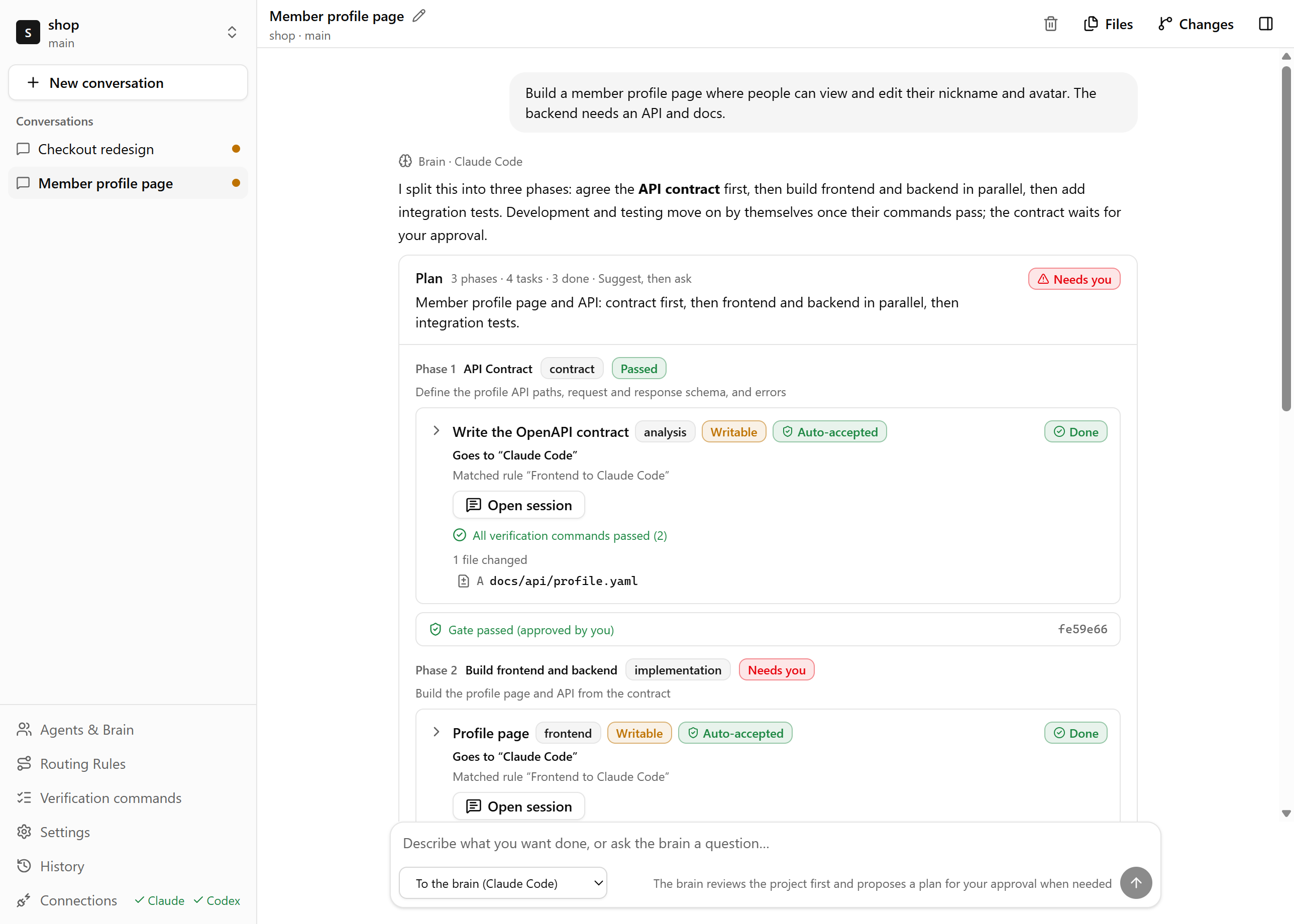
Describe the work once. Pyloxa plans it, hands each task to Claude Code or Codex on your own subscription, and checks the result before anything is merged.
These are Pyloxa’s example rules. You write your own, and every task shows the rule it matched.
Every result is checked
Working
Verified
Integrated
More than more agents
Plenty of tools let you run several agents side by side. Pyloxa handles what happens between them: who does which part, how you know it is done, and who takes over when one gets stuck.
Here is the same request handled by switching between CLIs yourself, and by handing it to Pyloxa.
| Switching CLIs yourself | With Pyloxa | |
|---|---|---|
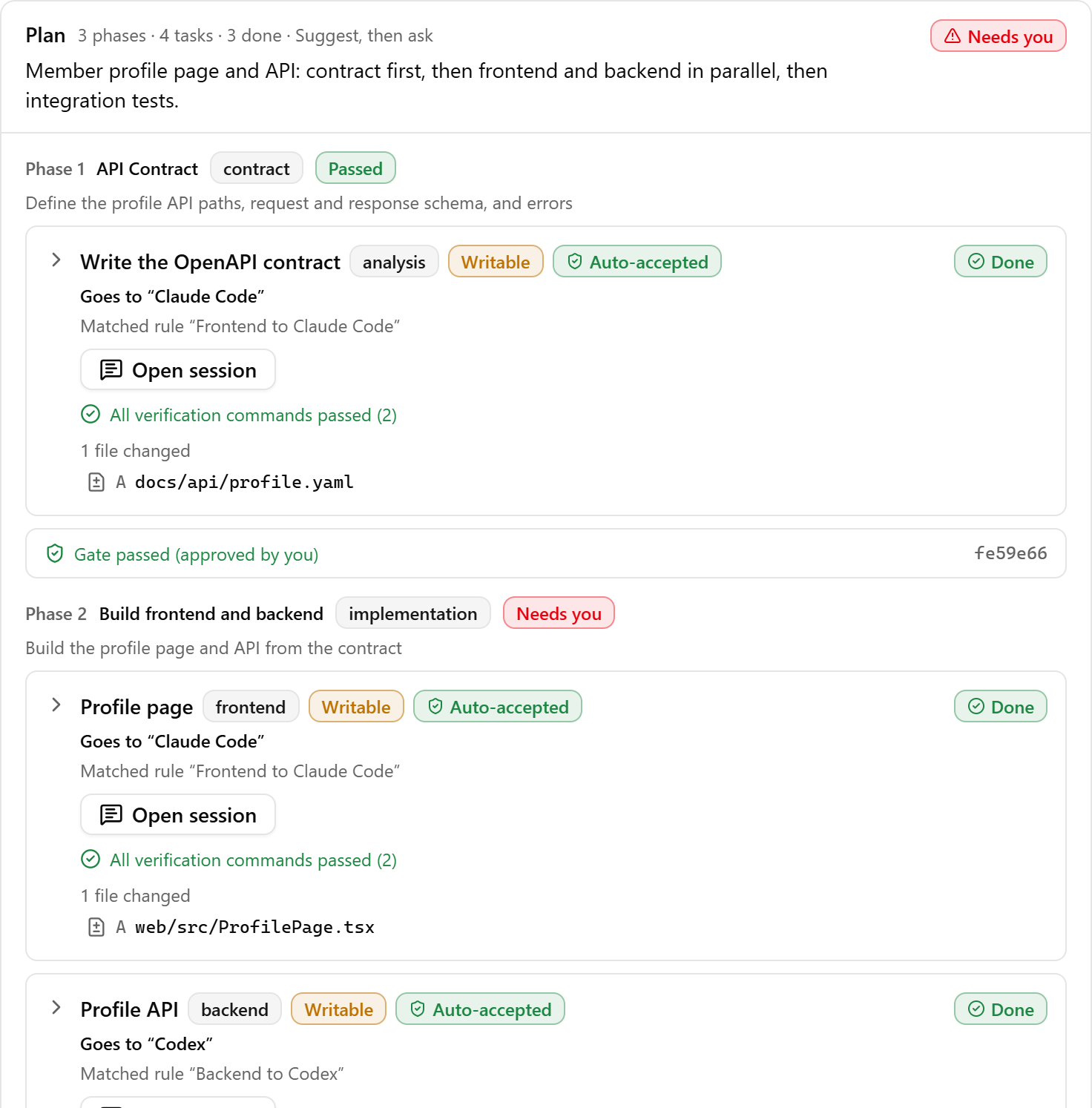
| Splitting the work | You decide which tool fits each part and paste the request over. | The brain breaks the request into phases and tasks and routes each one by your rules, naming the rule it matched. |
| Handoffs | When one agent finishes, you paste the API shape and file paths into the next. | The next phase receives a handoff package: the results, the checks that passed, and what to watch for. |
| Done means | The agent says it is done, and you run the tests to find out. | A task is done when your verification commands pass in its own worktree. If they fail, the agent gets one automatic fix. |
| Out of quota | You switch tools and explain again where things stand. | Pyloxa proposes the fallback from your rules; once you confirm, it continues from the files the first agent changed. |
| Your repo | The agent edits your working directory directly. | Every task works in its own git worktree. Merging and pushing stay your call. |
How it works
First, say what you want.
Then approve the plan.
Finally, merge what passed.
- Adocs/api/profile.yaml
- Aserver/src/routes/profile.ts
- Aweb/src/pages/Profile.tsx
- Atest/profile.test.ts
- Atest/contract.test.ts
Split the work your way
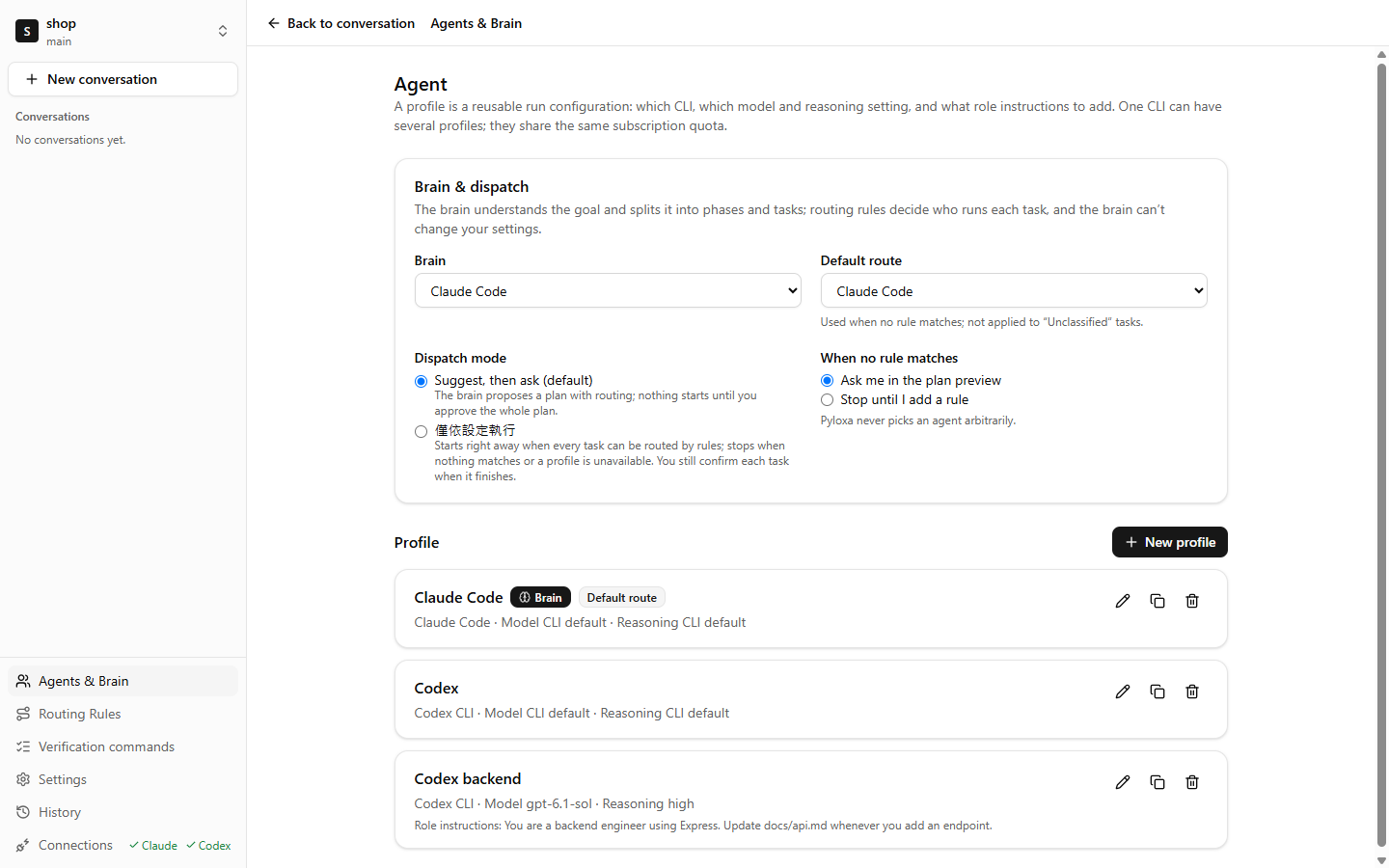
Which models to use, which work goes to whom, and when Pyloxa should stop and ask are all your settings. The brain only proposes plans; it cannot change any of them.
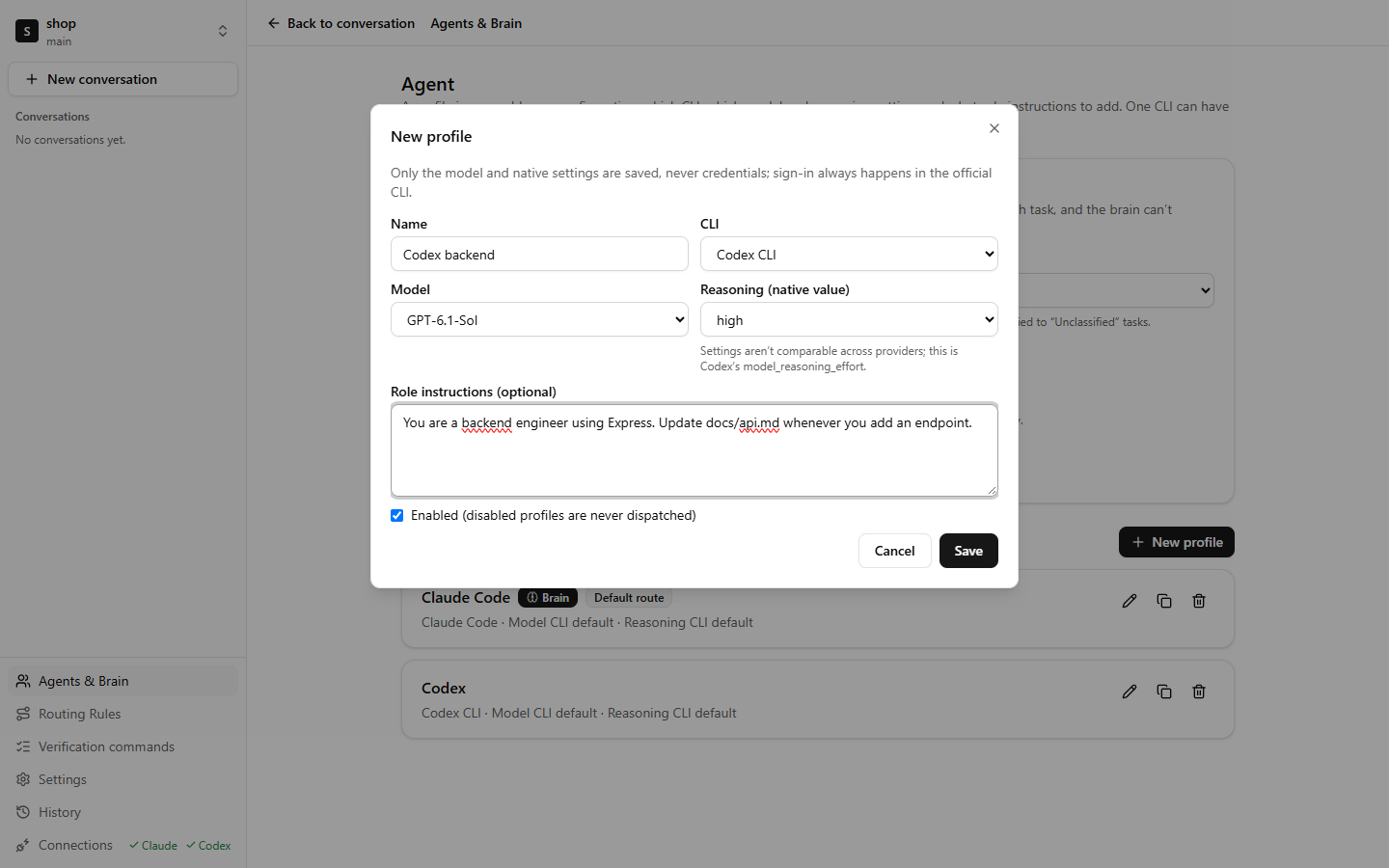
Every agent is a profile you set up
A profile picks the CLI, the model, the reasoning level, and a role prompt added to every task. One CLI can have several, such as "Claude frontend" and "Claude docs".
- The model list comes straight from the CLI you installed. Reasoning shows each CLI's own values (Claude Code's
--effort, Codex'smodel_reasoning_effort) rather than a made-up common scale. - Any profile can be the brain that reads the project and writes the plan, and the brain can use a different model from the agents doing the work.
- Profiles store settings only, never credentials.
Your rules decide who does what
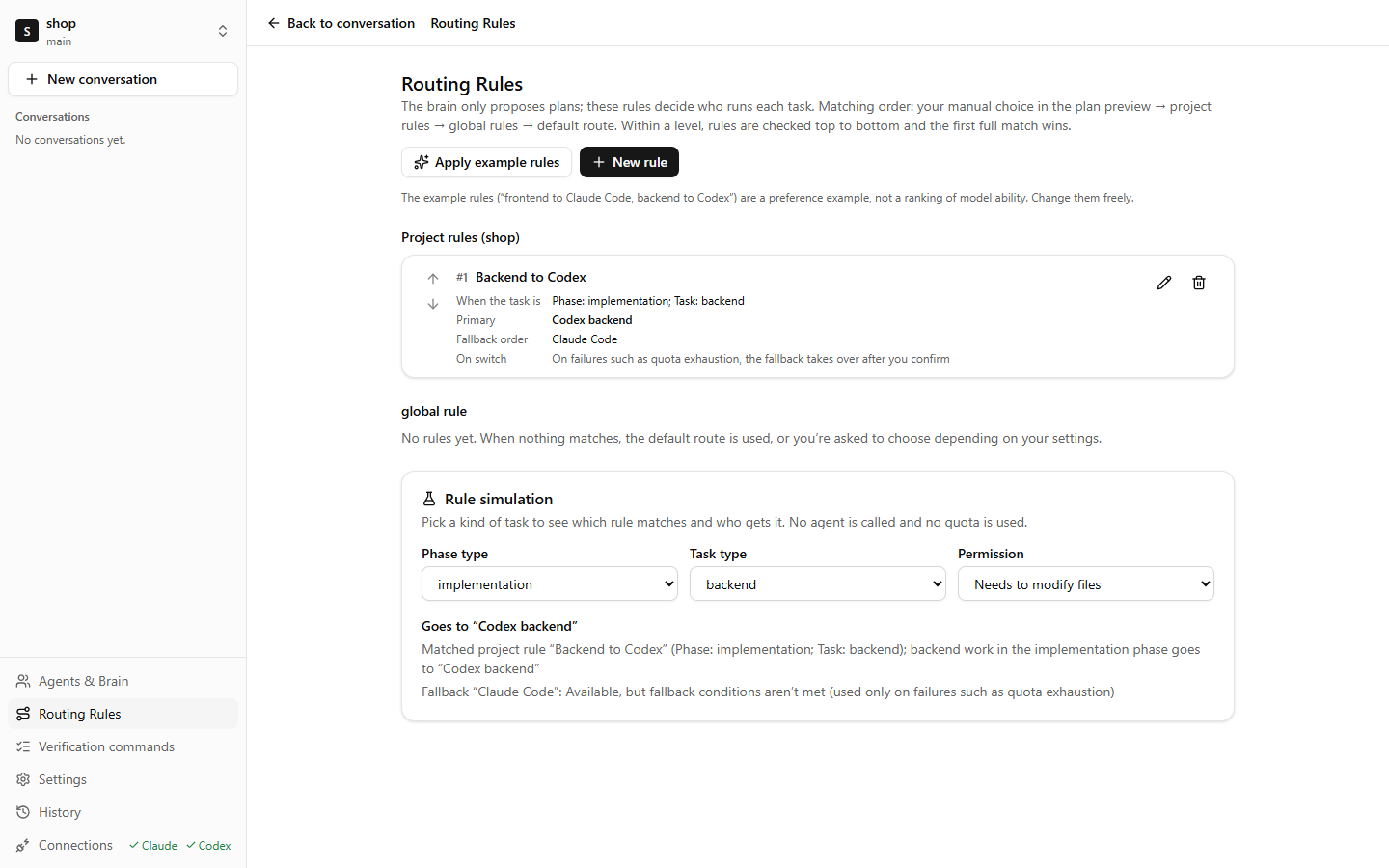
Rules match on phase type and task type, for example "backend work in the implementation phase goes to Codex backend". Each rule has a primary profile and a fallback order, and applies to every project or just the current one.
- Rules are checked top to bottom and the first full match wins. Pyloxa warns you when one rule hides another.
- Rule simulation calls no agent and uses no quota: pick a kind of task and see who gets it and why.
- When nothing matches, Pyloxa asks you in the plan preview or stops, as you choose. It never picks an agent at random.
Every phase is checked with your commands
The brain lays out phases to fit the request, such as specification, contract, implementation and testing. Before you approve, you can reassign a task, edit its instructions, or ask the brain to revise.
- Verification commands such as
npm run testneed your approval, and you can try them first in a temporary worktree. The brain can only use commands you approved. - Each finished task is checked in its own worktree; at the end of each phase, the gate runs again on the integrated result.
- A gate can move on by itself once it passes, or wait for your approval.
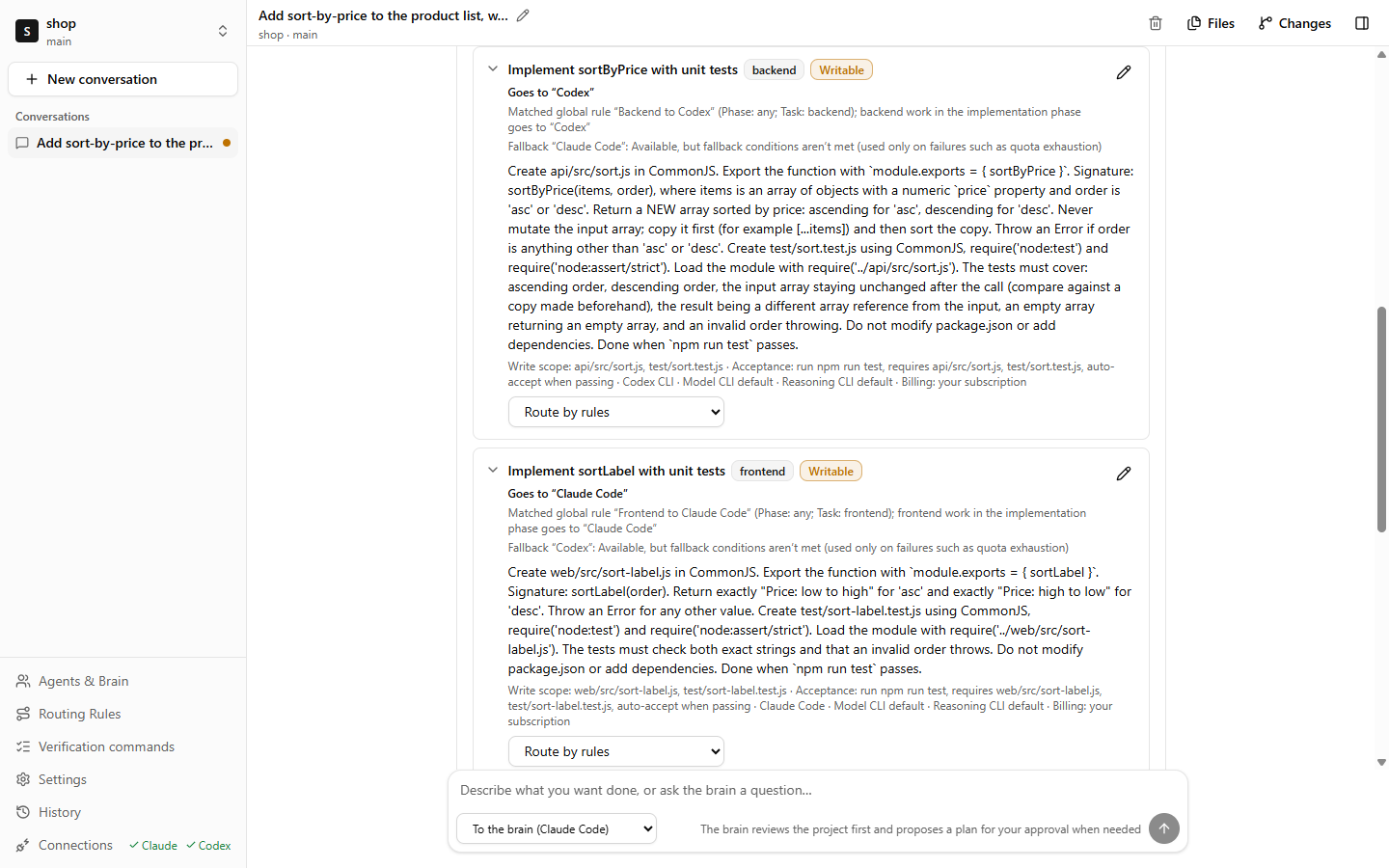
You decide how much to let go
The routing mode decides when Pyloxa asks you first. In every mode, pushing and deploying never happen on their own.
- The brain and the working agents are set up separately; a working agent running out of quota never replaces the brain.
- Each task gets at most 3 automatic tries, and plans have limits on tasks and time, so nothing retries forever.
One set of skills for every agent
Claude Code reads ~/.claude/skills; Codex reads ~/.agents/skills. Keep a copy of the same skill in each, change one, and the other goes stale. Pyloxa manages them in one place.
- InventoryFreeSee which skills each CLI has, and which share a name but differ in content.
- SyncProUse
~/.agents/skillsas the library and sync it to every CLI. Files you changed on the CLI side are never overwritten without asking. - AssignProPick the skills each project uses; Claude Code and Codex can also take them per profile.
- Routing packsProBundle rules, skills, phases and verification commands to share. Imports show each item first and never replace your existing rules.
| Name | Claude Code | Codex | shop project |
|---|---|---|---|
| api-contract | Synced | Synced | In use |
| react-conventions | Synced | Differs | In use |
| release-notes | Missing | Synced | Not used |
| db-migration | Synced | Synced | Not used |
| test-writer | Synced | Synced | In use |
Mockup. The inventory is in the free version since 0.1.2; sync, assignment and routing packs are Pro and still in development.
When one runs dry
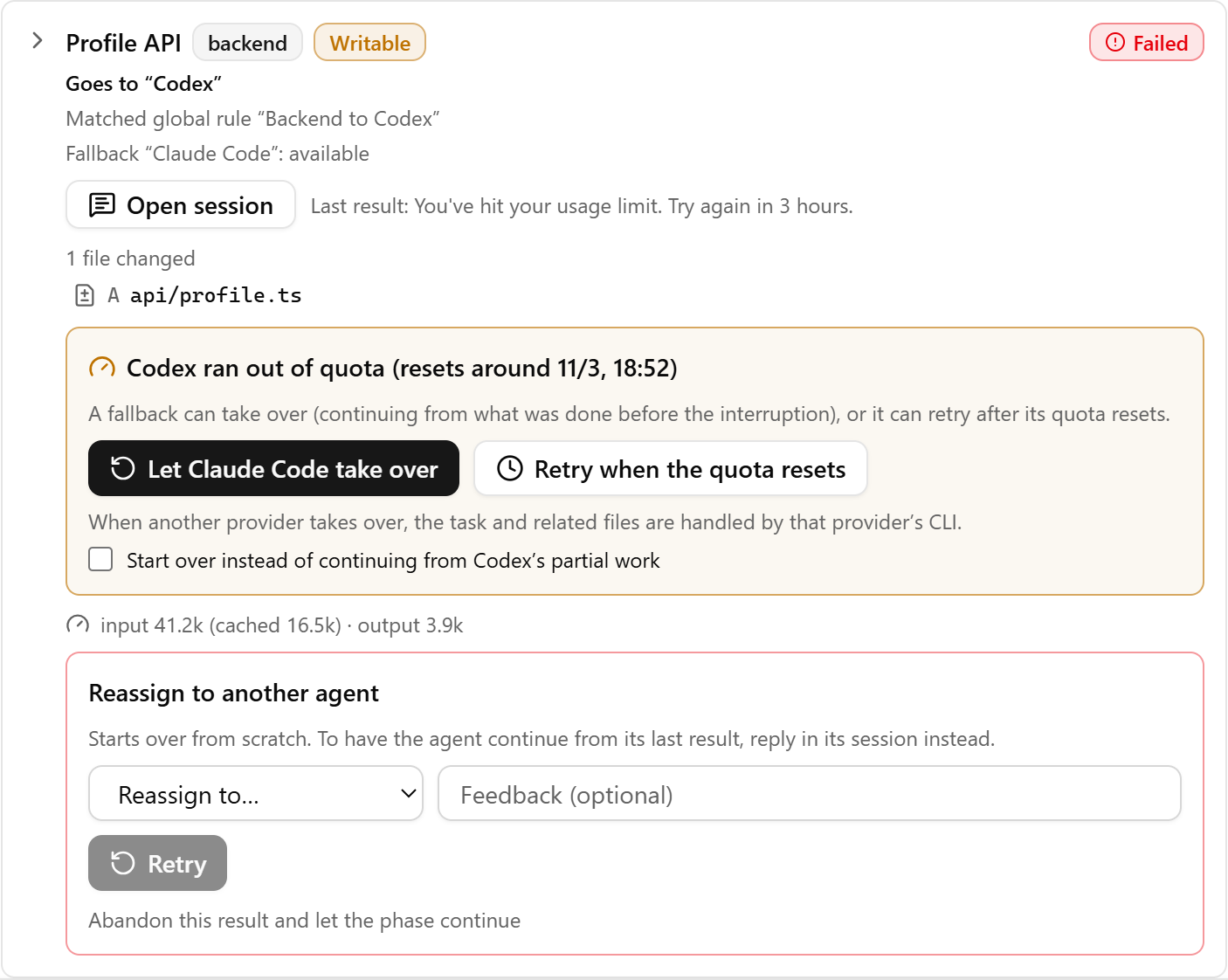
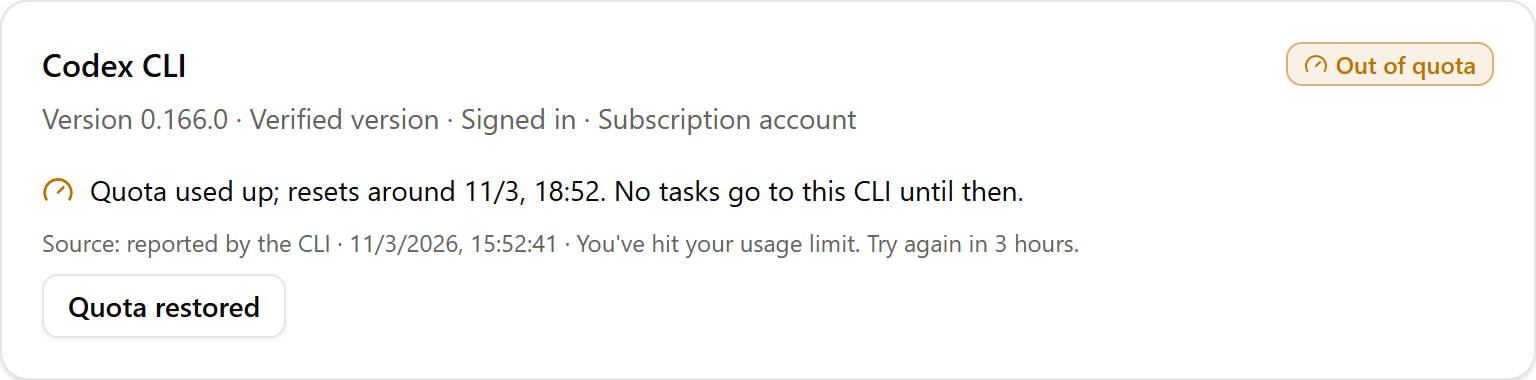
If Codex hits its usage limit halfway through a task, Pyloxa stops sending it work, shows when the quota resets, and offers the fallback from your rule. You confirm, and Claude Code continues from the files Codex already changed.
Run my tests on every task.
npm run test runs in each task’s own worktree. Pass, and the task is accepted for you; fail, and the agent gets one automatic fix.
Ask me before the next phase.
A phase passes its commands on the integrated version, then waits for one click from you. Leave it off and checked phases move on by themselves.
Never touch my credentials.
Pyloxa only runs the CLIs you signed in to. It never reads, copies or sends their tokens, and your working directory is never stashed or reset.
Reply in my language.
The interface and the agents’ replies in English, 繁體中文 or 简体中文, chosen separately.
| Free now, Pro soon | Free$0 no account needed | ProBuy once 12 months of updates, then keep it |
|---|---|---|
| Agents | Claude Code and Codex CLI on your own subscriptions or API keys; Gemini CLI on your own API key (experimental) | The same, plus API billing when a subscription runs out, if you allow it |
| Projects | One project working at a time; switch any time | Several projects working at once, with one inbox for everything waiting on you |
| Agent setup | Your own profiles: model, reasoning and role prompt; any profile can be the brain | Same |
| Plans and routing | Brain plans, routing rules, verification commands, phase gates | The same, plus automatic mode within the limits you set |
| When quota runs out | You confirm each takeover | An automatic fallback chain, and plans that wait for the next reset |
| Skills | See which skills each CLI has | One skills library synced to every CLI, assigned per project or profile, bundled into routing packs (in development) |
| Workspace | Files, Markdown, diffs, git, pull requests through gh | The same |
| Download for Windows | Early-bird sign-up opens soon. |
Free
$0
- Agents
- Claude Code and Codex CLI on your own subscriptions or API keys; Gemini CLI on your own API key (experimental)
- Projects
- One project working at a time; switch any time
- When quota runs out
- You confirm each takeover
Pro
Buy once
- Updates
- 12 months included, then keep using it
- Adds
- Several projects at once with one inbox, automatic mode within your limits, an automatic fallback chain, API billing fallback, quota scheduling and a shared skills library
Pro launches with several projects at once, the inbox, automatic mode and the fallback chain. Quota scheduling and skills arrive in later updates for both versions, and they are included in Pro’s 12 months of updates.
- Questions
-
No. Pyloxa runs the official CLIs you already set up (Claude Code, Codex CLI and, experimentally, Gemini CLI), so usage counts against your own subscription, or against your own API key if you choose one. Pyloxa never resells or proxies any AI service.
-
Windows 10 or 11 (64-bit), git, and at least one of Claude Code or Codex CLI, signed in. Gemini CLI is optional and experimental, and needs your own paid Gemini API key. With more than one CLI, the default flow splits the work and fallback becomes useful.
-
Never. It checks sign-in status with each CLI’s own command and starts the CLI as you would. Tokens and credential files are not read, copied or sent.
-
Pyloxa itself has no server and collects no telemetry. Your code goes only where the CLIs send it, under Anthropic’s, OpenAI’s and Google’s terms. Pyloxa asks GitHub for the latest Pyloxa version at startup and every 12 hours, with no project or usage data; you can turn this off in Settings. Usage statistics are computed on your computer and never sent.
-
Agents work in separate git worktrees. Your working directory is never stashed, reset or checked out by Pyloxa, and nothing is merged or pushed until you choose to.
-
The free installer is not code-signed yet, so SmartScreen may say it protected your PC. Choose More info, then Run anyway. You can compare the installer’s SHA-256 with the one on the release page first.
-
Yes. Each profile has its own model and reasoning setting, listed from the CLI you installed; leave them empty to use the CLI's defaults. The brain and the working agents can use different models.
-
Yes. Write a routing rule, such as "testing-phase work goes to Claude Code", for every project or just this one. You can also reassign a single task before approving a plan. New installs start with a default flow: Claude Code for frontend and video, Codex for backend and images, Gemini for writing and docs. Change it any time.
-
Subagents split work inside one CLI. Pyloxa splits work across CLIs: tasks can go to different CLIs, each runs in its own worktree, your commands check the results, and another CLI takes over when one runs out of quota. You can use both together.
-
Since 0.1.2, Gemini CLI is supported as an experimental option with your own paid Gemini API key. Google account sign-in and AI Pro or Ultra subscriptions are not supported. Gemini can run tasks such as writing and docs but can’t be the brain, and in unattended mode it can edit files but not run commands. Other agents are being evaluated.
-
The inventory is in the free version since 0.1.2: the Skills page lists the skills each CLI can read and flags skills that share a name but differ in content. Sync, per-project or per-profile assignment and routing packs are Pro and still in development; watch the release notes for the date.
-
Several projects working at once with one inbox, automatic mode, an automatic fallback chain, and later quota scheduling and a shared skills library. Pro is a one-time purchase with 12 months of updates, and you keep the last version after that. Leave your email in the plans table to get the early-bird price. The free version stays free.
No. Pyloxa runs the official CLIs you already set up (Claude Code, Codex CLI and, experimentally, Gemini CLI), so usage counts against your own subscription, or against your own API key if you choose one. Pyloxa never resells or proxies any AI service.
Say it once.
Install Pyloxa, open a project folder and describe what you want done. The brain reads the project first and asks before it plans anything big.
The installer is not code-signed yet; if SmartScreen appears, choose More info, then Run anyway.